
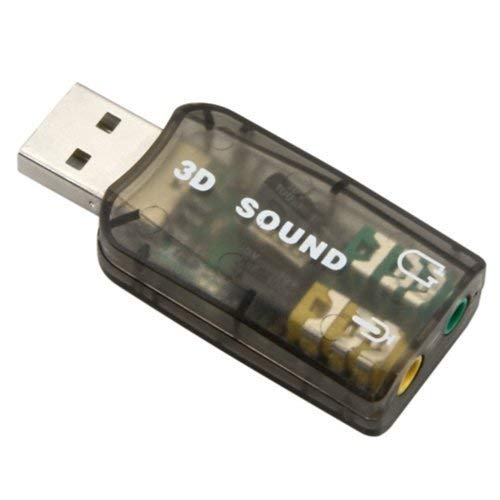

USB Audio Sound Adapter for PS3, PS4, Windows, Mac, Raspberry Pi and Linux. to be Used with External Headphone and Microphone
6,99 $
- Plug and play No drivers Needed
- USB Male to be inserted into your device and on the other side a Stereo output jack and microphone-input jack.
- Connect a headphone, a headset or external speakers to output stereo quality music.
- Connect a condenser microphone for PC recording, voice recognition or live webcast.
- Compatible with PS4, Linux, Mac, Raspberry Pi and Windows OS.
- Description
- Size Guide
- Reviews (0)
- More Products
- Store Policies
- Inquiries
Description
Features
* 3D stereo USB audio adapter with data transmission up to 12Mbps.
* USB 2.0 Full Speed and Backward compatible.
* Connectors: USB type A, stereo output jack, microphone input jack.
* requires no external power; Pair with your PC USB hub or a USB extension cable for a flexible installation.
* Plug & Play, no drivers needed.
System compatibility:
* Windows XP/Vista/7/8/8.1/10
* Mac OS 8.6 or above
* Raspberry Pi (Compatible with RPi -only- when not simultaneously using USB2.0 devices)
* PS3 and PS4
Where to use:
* Play Station external USB Audio Adapter for connecting external Microphone. (Note that Play-station will not output Audio to the USB, check other methods to output Audio).
* New Laptops that has a combo jack where you need TRRS headphone, use the adapter to split the combo jack into 1 headphone (TRS) and 1 Microphone (TRS).
* Laptop internal Microphone replacement, because some laptop microphones will get noise from its fan, or it’s near the sound source of the laptop. Use the adapter to get your Microphone work from a a distance with no noise.
* For a faulty sound card in a PC or alaptop, use this USB Audio adapter as a replacement.
Instructions:
Windows:
– Right-click on the sound icon in the taskbar
– Select Playback devices, then repeat again again and select Recording devices – insert the USB adapter while you are on Playback tab, (then repeat again on Recording Tab), a new USB PnP Sound Device will appear, set it as default.
Mac:
– Go to system Preferences and select Sound from Hardware options. – Select the Output tab; then scroll and select the new USB Audio Device. Do the same for sound Input under the Input tab.
Only logged in customers who have purchased this product may leave a review.
-
 Home & Kitchen
KCHEX Ocean Sea Animal Creature Fish Starfish Whale Octopus Crab Sea Horse Cake Cupcake Topper Picks For Party Decorations, pack of 48
6,98 $There is no AI review summary.Buy now -
 Musical Instruments
WALLER PAA 4 PCS Replacement Mic Battery Screw on Cap/Cover/Cup for SHURE PGX/SLX Wireless
19,53 $There is no AI review summary.Buy now -

-
 Bathroom, Home & Kitchen
Soap Saver for Shower Soap Holder Self-Adhesive Shower Soap Dish Waterfall Drain Soap Saver (White)
10,99 $There is no AI review summary.Buy now -
 Arts, Crafts & Sewing
Generic Hollow Punch Leatherworking Hole Punching Craft Tool 1″
11,99 $There is no AI review summary.Buy now

General Inquiries
There are no inquiries yet.


Reviews
There are no reviews yet.